Most server-side tracking guides pretend Shopify is just another website. It isn't. Shopify killed checkout.liquid, retired additional scripts, and stuffed every pixel into a sandbox. If your setup assumes you can drop a GTM snippet on the checkout, it's already broken.
Why can't I just add tracking scripts to Shopify checkout?
Because Shopify removed that ability on purpose. Checkout Extensibility replaced checkout.liquid, and by late August 2025 even Shopify Plus stores lost checkout.liquid on the thank-you and order status pages. Additional scripts went with it. On non-Plus plans you never had checkout script access at all.
What you get instead is the Web Pixels API. You add a "custom pixel" in Settings > Customer events, and Shopify runs your code in a sandbox: no direct access to the page DOM, restricted cookie access. Your pixel subscribes to a fixed menu of events Shopify publishes: page_viewed, product_viewed, product_added_to_cart, checkout_started, checkout_completed, and so on.
That sandbox is why browser-only tracking on Shopify got flaky. And it's why the purchase event needs to come from somewhere a browser can't break: Shopify's own backend.

| Layer | What sits there |
|---|---|
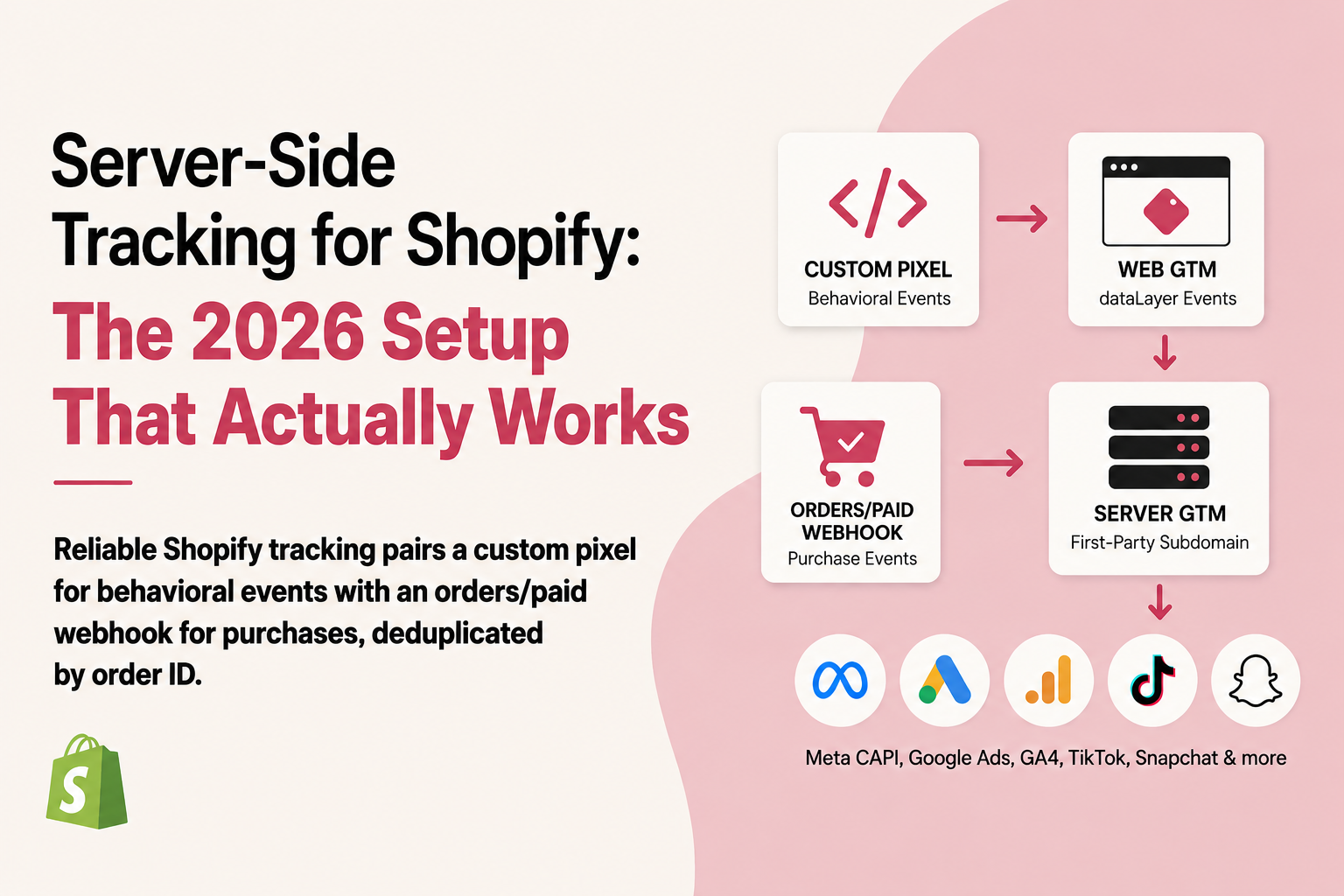
| Inputs | Custom pixel to web GTM, orders/paid webhook, fbclid and gclid off the cart |
| track.yourstore.com | A custom client verifies Shopify's HMAC and builds one event keyed on the order ID |
| Destinations | Meta CAPI, Google Ads enhanced conversions, GA4 Measurement Protocol, TikTok Events API |
What does a working Shopify server-side setup look like in 2026?
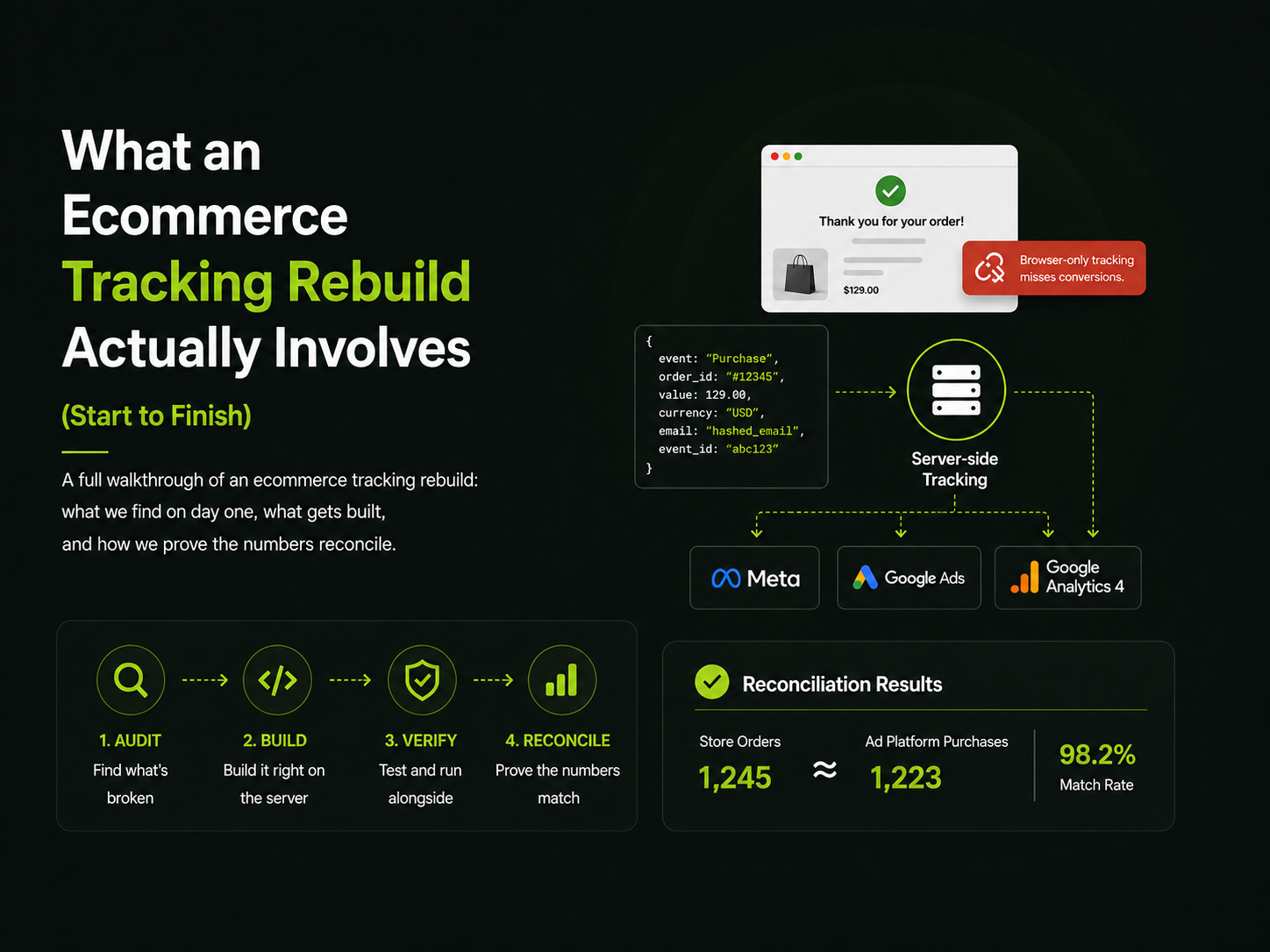
Five pieces, and the key design decision is that behavioral events and purchase events travel different roads.
- Custom pixel → dataLayer → web GTM. A custom pixel in Customer events loads your web GTM container inside the sandbox and translates Shopify's pixel events into GA4-style dataLayer pushes (
view_item,add_to_cart,begin_checkout). This covers everything up to the purchase. - Web GTM → sGTM on a first-party subdomain. Your GA4 tag sends events to your own tagging server, something like
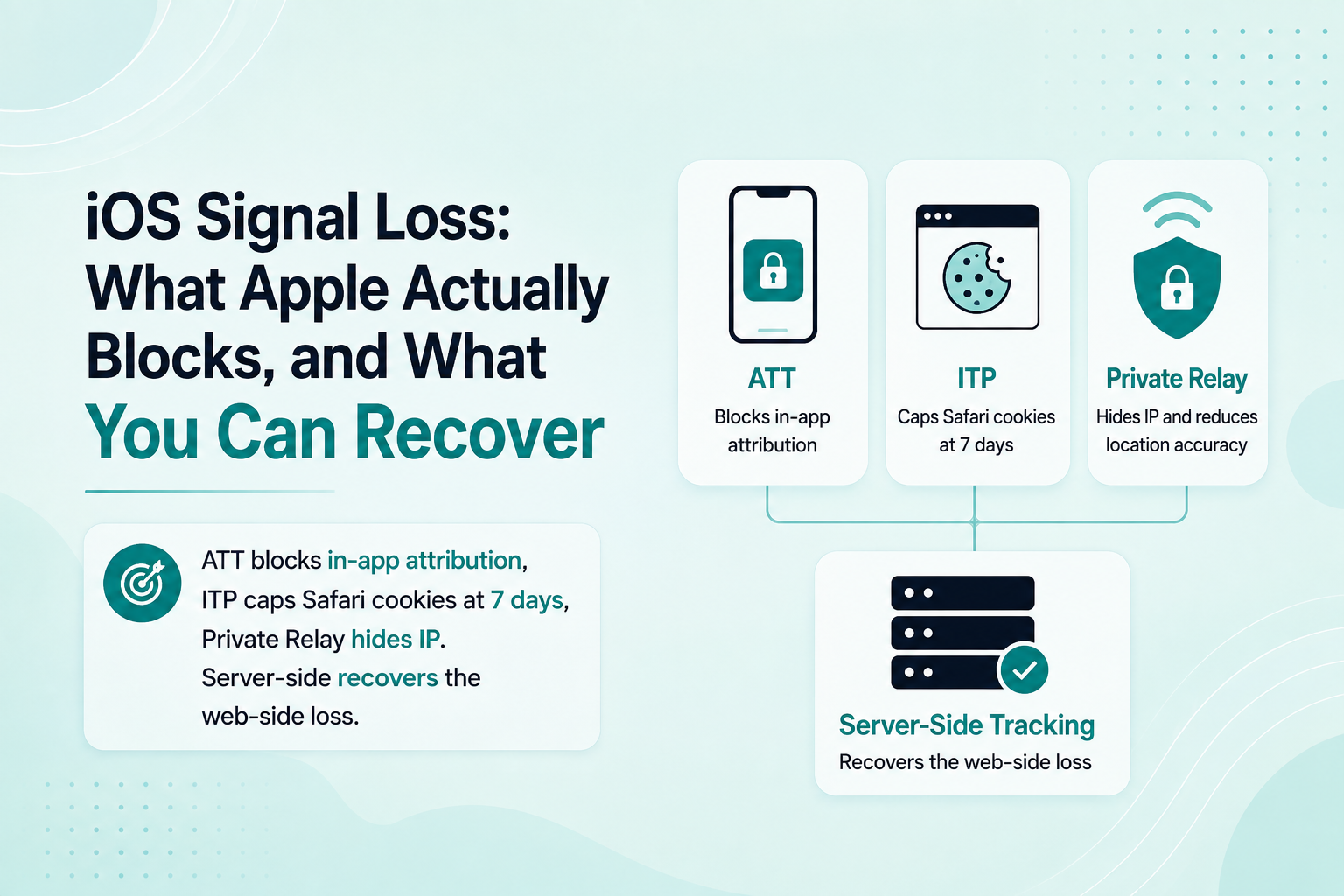
track.yourstore.com, hosted on Stape or Google Cloud Run. First-party serving matters: WebKit's ITP caps JavaScript-set cookies at 7 days, while cookies set server-side from your own subdomain get normal lifetimes, so_gaand_fbpstop resetting every week for Safari users. - orders/paid webhook → sGTM. Shopify fires a webhook the moment an order is paid, carrying the order ID, totals, currency, line items, and customer details. This is your purchase truth. It fires whether or not the customer ever saw the thank-you page.
- sGTM fans out to the platforms. Meta CAPI, Google Ads (via GA4 key events or enhanced conversions), GA4 Measurement Protocol, plus TikTok or Snap if you run them. One inbound event, multiple outbound tags.
- Deduplication by event_id. The browser
Purchase(if you send one) and the webhook purchase carry the same event ID, derived from the Shopify order ID, so platforms drop the duplicate.
Notice what's not in the list: relying on the thank-you page as your purchase source. That page is a suggestion, not a guarantee. The webhook doesn't care whether it ever loaded.
How do I set up the custom pixel for behavioral events?
Add a custom pixel under Settings > Customer events, paste in your GTM snippet, then subscribe to Shopify's events and push them to the dataLayer. The skeleton looks like this:
// Custom pixel — Settings > Customer events
window.dataLayer = window.dataLayer || [];
function gtag(){dataLayer.push(arguments);}

// Load web GTM inside the sandbox (standard GTM snippet with your ID)

analytics.subscribe('product_added_to_cart', (event) => {
  const item = event.data.cartLine;
  window.dataLayer.push({
    event: 'add_to_cart',
    ecommerce: {
      currency: item.merchandise.price.currencyCode,
      value: item.cost.totalAmount.amount,
      items: [{
        item_id: item.merchandise.sku,
        item_name: item.merchandise.product.title,
        price: item.merchandise.price.amount,
        quantity: item.quantity
      }]
    }
  });
});
Two sandbox realities to plan around. Your pixel can't read the page DOM, so everything has to come from the event payload Shopify hands you. And cookie access is restricted, which weakens browser-side match signals like _fbp and _fbc. That's another argument for letting the server side carry the purchase.
Shopify's pixel events also respect its Customer Privacy API, so consent collected through a Shopify-integrated banner gates what your pixel receives. Wire your GTM consent state to the same source rather than fighting it.

| Thank-you page tag | orders/paid webhook |
|---|---|
| Sandboxed pixel, no DOM access | Fires the moment payment lands |
| Redirects and closed tabs lose it | Independent of the browser |
| Upsells fire it early or twice | Order ID, totals, line items |
| Reported value misses the upsell | Matches Shopify's order count |
How do I get purchase events from the orders/paid webhook?
Create a webhook subscription for orders/paid that posts to an endpoint on your tagging server. Register it in the admin under notifications or via a small custom app; the custom app is the cleaner route because it gets you API access to customer fields. The payload gives you everything a conversion event needs:
id— the order ID, which becomes yourevent_idtotal_priceandcurrency— pick one definition of value and match it across platformsline_items— for content IDs and item-level data- customer email and phone — hashed as SHA-256 before they go to Meta or Google, which sGTM's tags handle for you
On the sGTM side, a custom client claims the incoming webhook, verifies Shopify's HMAC signature, and turns the payload into an event your Meta CAPI, GA4, and Google Ads tags can read. Stape ships a ready-made Shopify integration for this; self-hosting means a community client template or a slim one you write.
One honest trade-off: a webhook arrives without browser context. No _fbp cookie, no click IDs, unless you capture them earlier and stitch them back. The standard fix is storing fbclid, gclid, and _fbp against the cart or customer (cart attributes, or a first-party store keyed to a session ID) so the server purchase goes out with full match parameters. Skip this and your webhook-only setup can report worse Meta match quality than the browser pixel it replaced.
How do I deduplicate purchases between browser and server?
Give both events the same name and the same ID, and let the platform drop the copy. Meta deduplicates when a browser event and a server event share event_name and event_id; the Shopify order ID is the natural key because both checkout_completed and the orders/paid webhook can produce it. In GA4, keep transaction_id identical everywhere.
So the browser purchase from your custom pixel goes out with event_id = order_id, and the webhook purchase goes out with the same. You get coverage when the browser event never fires (blocked, abandoned thank-you page) and no double counting when both do.
Check it in Meta Events Manager: the Purchase event detail shows browser and server counts with a deduplication indicator. Server purchases with no browser pair are expected for a slice of traffic. If none deduplicate, your IDs don't match, and the usual culprit is one side sending the order number ("#1001") while the other sends the numeric order ID.

- One order is paid — A single real Shopify order
- Native channel CAPI — Facebook & Instagram app sends Purchase
- Your setup fires too — A second Purchase, different event_id
- Meta counts two — ROAS soars and budget scales into a mirage
- One shared event_id — Order ID on both sides, so Meta drops the copy
What are the common Shopify tracking traps?
Three failure modes show up over and over on Shopify stores, and all three produce numbers that look plausible enough to survive for months.
Why are my purchases double-counted?
Because two systems are reporting the same order without shared event IDs. The classic pair: the native Facebook & Instagram channel sending CAPI purchases while a custom pixel or tracking app sends its own. Each looks correct in isolation. Together they report every order twice, and your ad spend scales into a mirage. Pick one purchase source of truth, or force every source onto the same event_id.
Why is my thank-you page missing conversions?
Because a meaningful share of buyers never render it. Payment redirects that don't return cleanly, tabs closed at "payment accepted," in-app browsers dying mid-redirect. Browser-only purchase tracking undercounts, full stop. The webhook lane closes this gap, and comparing webhook purchase counts against Shopify's own order count is the fastest health check I know: they should match almost exactly.
Why do upsell apps break purchase tracking?
Post-purchase upsell flows sit between payment and the thank-you page, and they mangle naive setups two ways. The initial purchase event can fire before the upsell is accepted, so your reported value misses the upsell revenue. And some app flows re-trigger purchase tracking when the final thank-you page loads, double-counting the original order. The webhook approach mostly sidesteps this, since orders/paid fires on the real order and everything dedupes by order ID. If you run post-purchase upsells, test a full upsell order end to end before trusting any number.
Do I need Shopify Plus for server-side tracking?
No. The pieces this setup depends on, custom pixels via Customer events and webhooks, are available on standard Shopify plans, not just Plus. Plus mainly buys deeper checkout customization through checkout extensions, which is a UX concern more than a tracking one. Plan gating shifts, so check Shopify's current plan comparison if that detail matters to you.
What you do need is somewhere to run the server container. Stape hosts sGTM from around $20 a month and ships Shopify-specific pieces that shortcut the webhook work. Google Cloud Run is the self-managed route: cheap at low volume, more moving parts. Either way, put it on your own subdomain. A tagging server on someone else's domain gives back half the first-party benefit you built this for.
Frequently asked questions
Does Shopify have built-in server-side tracking?
Partly. The native Facebook & Instagram and Google & YouTube channel apps send server-side events including purchases, but you don't control the parameters, the consent wiring, or deduplication with anything else you run. A fine floor, not a full setup.
Can I install Google Tag Manager on Shopify checkout?
Not directly. Checkout pages don't accept theme scripts, so GTM runs there only inside a custom pixel added under Settings > Customer events, sandboxed, with events limited to what Shopify's Web Pixels API publishes.
What is the most reliable purchase event source on Shopify?
The orders/paid webhook. It fires from Shopify's backend the moment payment lands, independent of the thank-you page, ad blockers, or the customer's browser, and it carries the order ID you need for deduplication.
How does Meta deduplicate Shopify purchase events?
Meta matches a browser event and a server event that share the same event_name and event_id and counts them once. On Shopify, build the event_id from the order ID on both sides and verify the deduplication indicator in Events Manager.
Do I need Stape for Shopify server-side tracking?
No, but you need sGTM hosted somewhere: Stape is the low-maintenance option with Shopify-specific helpers, Google Cloud Run the self-managed alternative. Same architecture either way.
Will server-side tracking fix iOS signal loss on my Shopify store?
It recovers a real portion: webhook purchases don't depend on the browser, first-party cookies live longer under ITP, and better match parameters raise Meta's Event Match Quality. It can't recover users who opted out under Apple's ATT, and nothing legitimately can.
Why does my Shopify ROAS look too good to be true?
Usually duplicate purchase events: a native channel app and a custom setup both reporting every order without shared event IDs. If platforms report more purchases than Shopify shows orders for the same window, you're double-counting.