I still audit sites in 2026 where the cookie banner loads a full second after the Google tag has already fired and dropped cookies. That's the whole game lost in one second. The owner thinks a banner means compliance and GA4 numbers mean good data. Both wrong, and the fix is order of operations, not new tools.
What did Consent Mode v2 actually change?
It added two consent signals to the two that already existed: ad_user_data, which controls whether user data can be sent to Google for advertising, and ad_personalization, which controls whether that data can power personalized ads and remarketing. The original pair stays: ad_storage governs advertising cookies, analytics_storage governs analytics cookies.
Google started enforcing this in March 2024. Since then, if you want audience building, remarketing lists, or personalized ads for EEA and UK users, those two new signals must arrive with your data. No ad_user_data granted, no user data accepted for ads. No ad_personalization, no remarketing. Audience lists for EEA traffic simply stop filling if the signals are missing or denied.
All four signals travel with every Google request as a compact parameter (you'll see gcs and gcd in the network tab). That's how Google Ads and GA4 know, hit by hit, what they're allowed to do with each event.
Who actually has to run Consent Mode v2?
You need it if two things are both true: you get traffic from the EEA, UK, or Switzerland, and you use Google's advertising features on that traffic. That covers Google Ads conversion tracking, remarketing, GA4 audiences exported to Ads, and Smart Bidding. If you sell into Europe at all, that's you.
A US-only site with zero European visitors doesn't need it for Google's sake. But "US-only" is usually wishful thinking; I've pulled geo reports on plenty of "domestic" stores and found a real slice of European sessions. The clean answer is region-scoped defaults, shown below. You don't have to punish US traffic to protect EU traffic.
Should you run basic or advanced consent mode?
Advanced mode keeps far more signal, and it's what I set up whenever the client's legal side signs off. Here's the actual difference:
| Basic mode | Advanced mode | |
|---|---|---|
| Before consent | Google tags are blocked entirely. Nothing loads, nothing is sent. | Tags load but hold back cookies. They send cookieless pings that carry the consent state. |
| After "accept" | Tags fire normally from that point on. | Tags switch to full behavior with cookies. |
| After "decline" | Still nothing. Google learns nothing about the visit. | Cookieless pings continue. No cookies, no identifiers stored. |
| Conversion modeling | General modeling only, built without your site's own decline-side data. | Modeling trained on your own consented data plus the cookieless pings. Noticeably better recovery. |
| Legal posture | Most conservative. Easy conversation with a DPO. | Depends on jurisdiction and your legal team's read on cookieless pings. |
The trade is simple. Basic mode is the easy compliance conversation because nothing touches the browser before consent. Advanced mode gives Google anonymous, cookieless signals from declined users, which feeds much better modeling. Some legal teams accept that since no cookies are set and no identifiers persist; some don't. I'm a tracking engineer, not your lawyer: bring the question to whoever owns privacy, and push for advanced if they'll clear it. The signal difference is real.

| Basic mode | Advanced mode |
|---|---|
| Google tags blocked entirely | Tags load but hold back cookies |
| Nothing sent from decliners | Cookieless pings carry consent state |
| General modeling only | Modeling trained on your own data |
| Easiest conversation with a DPO | Needs your legal team's sign-off |
How does conversion modeling fill the gap?
Modeling estimates the conversions you can't observe from declined users, trained on the users who did consent. Advanced mode's cookieless pings tell Google an ad click happened and a conversion happened; cookies just can't join them. The model learns from consented journeys on your site and attributes an estimated share of those orphaned conversions back to campaigns.
Those modeled conversions flow into Google Ads reporting and into Smart Bidding. That last part is why I care: bidding algorithms starved of conversions bid badly. Modeling isn't cosmetic, it's feeding the machine that spends your budget.
Two caveats. Modeling needs volume; Google's published minimums for ad-click modeling sit around 700 ad clicks over seven days per country-and-domain grouping, so small accounts see less benefit. And modeling covers Google only. Nothing for Meta or TikTok, which matters when we get to server-side.

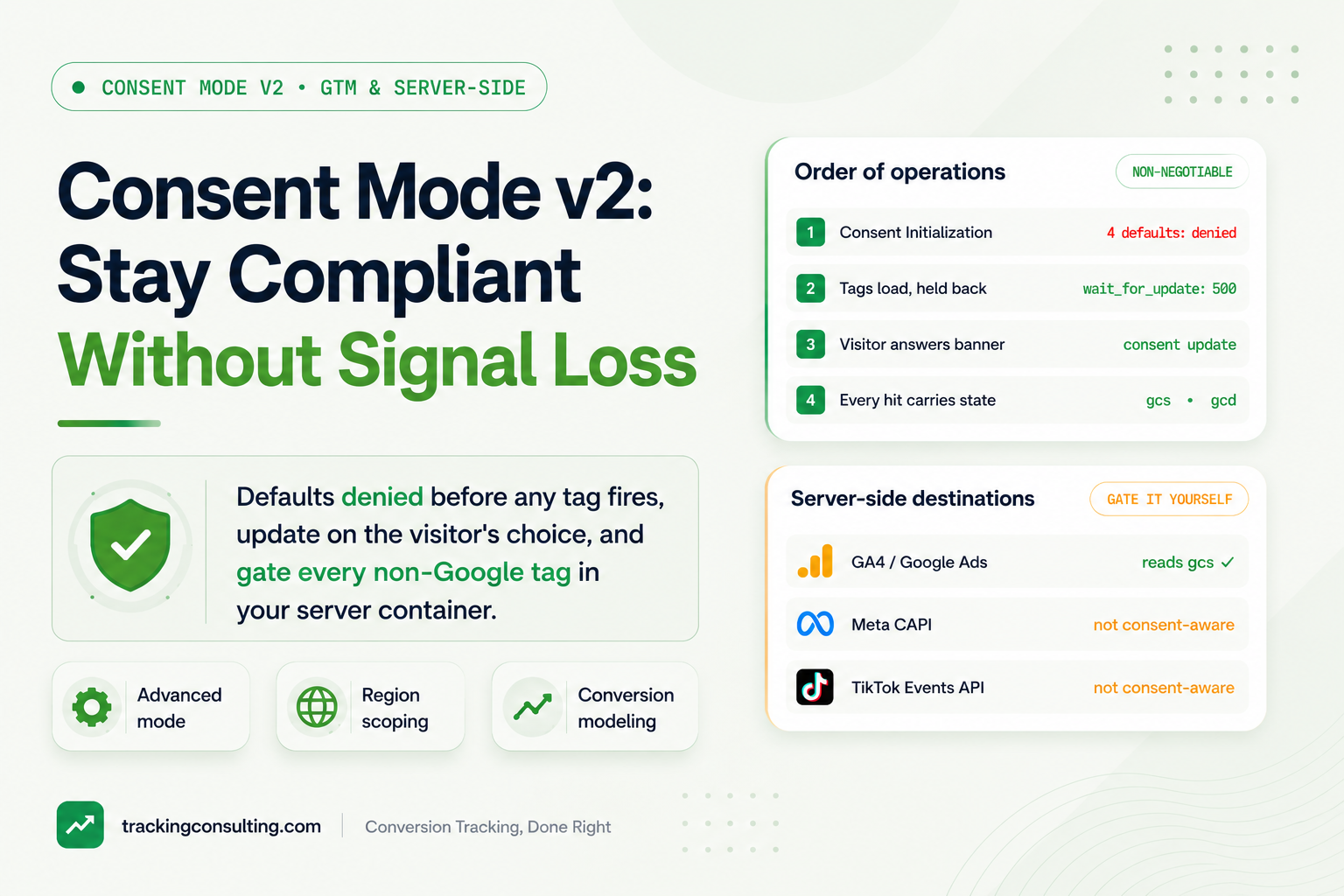
- Consent Initialization — Four defaults denied for the EEA, UK and CH
- Tags load, held back — wait_for_update: 500 pauses for the CMP
- Visitor answers banner — The CMP fires a consent update call
- Tags switch behavior — Cookies written only for signals granted
- gcs and gcd on hits — Google knows, hit by hit, what it may do
How do you wire your CMP into GTM the right way?
The setup is a strict sequence: defaults first, tags second, update on choice. Here's the order I follow on every build:
- Pick a CMP that speaks consent mode natively. Cookiebot, CookieYes, Usercentrics, OneTrust, and Iubenda all ship Google-certified integrations and GTM templates. Don't hand-roll banner logic in 2026; the edge cases (return visits, withdrawal, region detection) will eat you.
- Set denied defaults before anything else runs. In GTM, the CMP template fires on the Consent Initialization trigger, which exists specifically to run before all other triggers. On hardcoded gtag, the default command goes above the Google tag snippet in the page source:
gtag('consent', 'default', {
  ad_storage: 'denied',
  ad_user_data: 'denied',
  ad_personalization: 'denied',
  analytics_storage: 'denied',
  wait_for_update: 500,
  region: ['AT','BE','BG','HR','CY','CZ','DK','EE','FI','FR','DE','GR','HU','IS','IE','IT','LV','LI','LT','LU','MT','NL','NO','PL','PT','RO','SK','SI','ES','SE','GB','CH']
});
// Everywhere else: granted by default
gtag('consent', 'default', {
  ad_storage: 'granted',
  ad_user_data: 'granted',
  ad_personalization: 'granted',
  analytics_storage: 'granted'
});- Scope defaults by region. That
regionarray is the difference between compliance and self-sabotage: denied for the EEA, UK, and Switzerland; granted elsewhere unless your lawyer says otherwise. A global denied default throws away US signal no regulator asked you to throw away. - Send the update when the visitor chooses. The CMP fires
gtag('consent', 'update', {...})with the actual choices. Certified templates handle this, including persisting the choice across pages. - Use wait_for_update. That
wait_for_update: 500gives the CMP half a second to load a returning visitor's stored choice. Without it, a returning "accept all" visitor gets their first hits sent as denied. - Verify before you walk away. In Tag Assistant, the Consent tab should show the default state on consent initialization, then the update after a banner choice. Then watch the
gcsparameter on GA4 network requests change between a declined and an accepted session. If it never changes, your update isn't wired.
How does consent interact with server-side tagging?
Your server container is bound by the same consent choices as the browser. Google's side mostly handles itself: consent state rides along on the GA4 request in gcs and gcd, and Google tags inside sGTM respect it, as long as a custom client or rewrite doesn't strip those parameters.
The trap is everything that isn't Google. Consent Mode is a Google framework; your Meta CAPI tag, TikTok Events API tag, and every other server-side destination have no idea it exists. If sGTM forwards every incoming event to Meta, you're sending declined EU users' data to Meta from your own server. The server doesn't get a pass because the request came from your backend instead of the browser.
So gate it yourself. Read the consent state in the server container (from gcs/gcd, or a consent field in the payload) and put a blocking condition on every non-Google tag: no ad consent, no CAPI event for that user. I build one variable that parses the consent parameter, and every vendor tag checks it. Ten minutes of work; it closes the most common compliance hole I find in server-side setups.

| Layer | What sits there |
|---|---|
| Inputs | GA4 hit carrying gcs and gcd, Shopify or CRM webhooks, Measurement Protocol hits |
| Server container | One variable parses the consent state, and every non-Google tag checks it first |
| Destinations | GA4 and Google Ads, Meta CAPI, gated, TikTok Events API, gated |
What mistakes quietly break compliance or signal?
Three failures show up over and over in audits, and all three are order-of-operations problems.
Defaults firing after tags. The consent default has to be the first Google-related thing that executes. I regularly find a hardcoded GA4 snippet in a theme header firing before GTM loads, or a consent template on a Page View trigger instead of Consent Initialization. The first hit of every session then goes out as if consent didn't exist, and that's the hit carrying the ad click ID. Data leaked and attribution torched in one move.
Consent state never reaching sGTM. Custom clients that strip gcs, Measurement Protocol hits built server-side with no consent field, webhook events from Shopify or a CRM with no consent lookup. The server container then treats everyone as consented and fires every tag for every user. If conversions flow through a webhook, capture the consent state at collection time and store it with the record, or you can't lawfully replay it to ad platforms later.
Treating US traffic like EEA traffic. The reverse mistake: denied-by-default applied worldwide because nobody touched the CMP's region settings. A California visitor gets a GDPR banner, declines out of habit, and you lose a conversion no law required you to lose.
Get those three right and the supposed conflict between compliance and signal mostly evaporates. Compliance dictates what happens for declined EU users; advanced mode, modeling, and correctly scoped regions preserve everything else. They only fight when the order of operations is wrong.
Frequently asked questions
Do I need Consent Mode v2 if I don't run Google Ads?
If you only use GA4 for measurement, the March 2024 enforcement doesn't bite the same way. You still need a lawful consent setup for EEA users under GDPR and ePrivacy rules, and consent mode is the cleanest way to make GA4 respect it.
Is advanced consent mode GDPR compliant?
It's designed to be: after a decline, no cookies are set and the pings are cookieless. Whether that design satisfies your regulator and your DPO is a legal judgment, not a technical one, so get sign-off before choosing advanced over basic.
Does Consent Mode v2 apply to US traffic?
No. Google's requirement covers the EEA, UK, and Switzerland. Use the region parameter so US visitors default to granted while European visitors default to denied, unless your own legal obligations say otherwise.
Does consent mode cover Meta Pixel and CAPI?
No. Consent Mode is Google-only. You have to block the Meta Pixel through your CMP's category settings in the browser and gate CAPI events on consent state in your server container yourself.
How do I test that Consent Mode v2 is working?
In Tag Assistant's Consent tab, defaults should appear on consent initialization, before any tag fires, then update after your banner choice. Confirm the gcs parameter on GA4 requests differs between an accepted and a declined session.
Will I lose conversions when I turn on Consent Mode v2?
You'll lose directly observed conversions from EU users who decline; that's the law working as intended. Advanced mode plus conversion modeling recovers a meaningful share in reporting and bidding, and region-scoped defaults make sure you lose nothing anywhere else.